SoftPerfect Network Scanner

SoftPerfect Network Scanner: Fast, Practical Scanning for Busy Admins There’s no shortage of network scanners out there, but SoftPerfect Network Scanner tends to land on the USB drives of people who actually work in the field. It’s quick to launch, doesn’t need installation, and gets straight to the point: what’s online, what ports are open, and what can be seen without poking the firewall too hard.

This tool’s been around for years — and it shows, in a good way. No bloat, no surprises, just ef

SoftPerfect Network Scanner: Fast, Practical Scanning for Busy Admins

There’s no shortage of network scanners out there, but SoftPerfect Network Scanner tends to land on the USB drives of people who actually work in the field. It’s quick to launch, doesn’t need installation, and gets straight to the point: what’s online, what ports are open, and what can be seen without poking the firewall too hard.

This tool’s been around for years — and it shows, in a good way. No bloat, no surprises, just efficient IP and port scanning with extras like shared folder detection and WMI queries.

What It Handles Well

Function Use
IP scanning Pings hosts in any range, returns up/down status fast.
Port checks Can scan custom TCP port sets — good for surface mapping.
MAC and vendor lookup Resolves MAC addresses and shows device vendor info (if available).
Shared folder listing Finds visible and hidden SMB shares on Windows systems.
Remote services and registry Pulls data from Windows machines if creds are set.
Script support Lets you run your own commands or scripts per host.
Data export Clean outputs in CSV, XML, HTML — for reports or tools.
Portable No install needed — works from a flash drive in the field.

Where It Comes in Handy

– Checking what’s alive in a subnet, fast
– Finding rogue hosts or undocumented endpoints
– Auditing share permissions during user cleanup
– Spot-checking systems before a migration
– Running light pre-checks in security assessments

Quick Setup and Run

1. Grab the tool
From https://www.softperfect.com/products/networkscanner/ — either as a ZIP or installer.

2. Start the app
No install needed if you use the portable version. Just run it.

3. Pick a scan range
You can type 192.168.0.1–254, a CIDR range like 10.0.0.0/24, or even feed it from a file.

4. Configure scan options
– Ping, ARP, hostname resolution
– Port range or list
– Share discovery, logged-in user fetch, uptime, WMI info

5. Set credentials (optional)
If you want deeper info from Windows machines, you can add domain or local admin credentials.

6. Hit “Start Scanning”
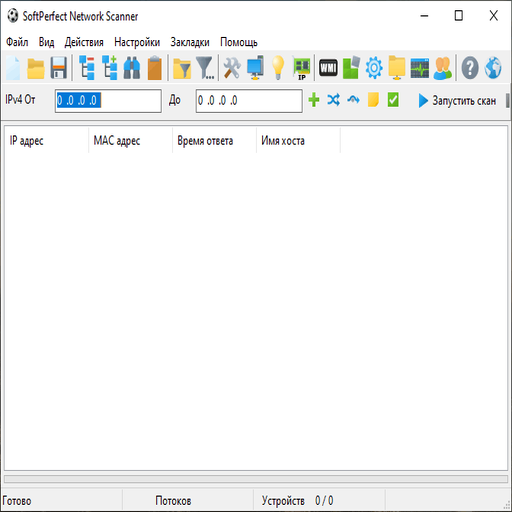
Results appear in a sortable grid. You can filter, search, export — or copy and move on.

A Few Limitations

– Free version is licensed for personal or non-commercial use only
– No SNMP scanning or deep Linux discovery
– Some data collection features require firewall tweaks on targets
– Not built for continuous monitoring — this is point-in-time scanning

Why It’s Still Relevant

SoftPerfect Network Scanner isn’t a flashy tool, and that’s exactly the point. It’s what people use when they’re asked “can you see what’s in this range?” and they don’t have 30 minutes to configure a full suite. It’s reliable, fast, and — once you’ve used it a few times — you’ll probably keep a copy nearby.

For simple, effective scanning jobs in Windows-heavy networks, it’s hard to beat.

SoftPerfect Network Scanner: Streamlining Your Backup Strategy

Managing backups can be a daunting task, especially for large networks. SoftPerfect Network Scanner offers a comprehensive solution to simplify your backup process. In this article, we will explore how to use SoftPerfect Network Scanner for offsite backups, creating a local and offsite backup strategy, and discuss its features as a free backup software download and alternative to expensive backup suites.

Understanding the Backup Process

Before diving into the specifics of SoftPerfect Network Scanner, it’s essential to understand the importance of a well-structured backup strategy. A good backup plan should include regular backups, retention rules, and encrypted repositories. SoftPerfect Network Scanner provides a user-friendly interface to manage these tasks efficiently.

SoftPerfect Network Scanner мобильный сценарий

Setting Up SoftPerfect Network Scanner for Offsite Backups

To set up SoftPerfect Network Scanner for offsite backups, follow these steps:

  • Install SoftPerfect Network Scanner on your machine.
  • Configure the software to scan your network and detect devices.
  • Create a backup job and select the devices you want to back up.
  • Choose the offsite backup location and configure the retention rules.
  • Encrypt the backup repository for added security.

Creating a Local and Offsite Backup Strategy

A well-rounded backup strategy should include both local and offsite backups. SoftPerfect Network Scanner allows you to create a comprehensive backup plan that includes:

Backup Type Frequency Retention
Local Backup Daily 30 days
Offsite Backup Weekly 90 days

SoftPerfect Network Scanner as a Free Backup Software Download

SoftPerfect Network Scanner offers a free version that includes most of the features you need to manage your backups. While the free version has some limitations, it is an excellent alternative to expensive backup suites. Here’s a comparison of SoftPerfect Network Scanner with other popular backup software:

Software Free Version Cost Features
SoftPerfect Network Scanner Yes Free Backup management, offsite backups, encryption
Backup Software A No $100/year Backup management, offsite backups, encryption, advanced features
Backup Software B Yes $50/year Backup management, offsite backups, basic features

In conclusion, SoftPerfect Network Scanner is an excellent choice for managing your backups. Its user-friendly interface, comprehensive features, and free version make it an attractive alternative to expensive backup suites. By following the steps outlined in this article, you can create a well-structured backup strategy that includes local and offsite backups, retention rules, and encrypted repositories.

SoftPerfect Network Scanner мобильный сценарий

SoftPerfect Network Scanner is a powerful tool that can simplify your backup process and provide peace of mind. Download the free version today and start streamlining your backup strategy!

SoftPerfect Network Scanner: Comprehensive Backup Solution

Backing up data is an essential task for any organization, and SoftPerfect Network Scanner offers a reliable and efficient solution. In this article, we will explore how to use SoftPerfect Network Scanner for offsite backups, creating a local and offsite backup strategy, and discuss its features as a free backup software alternative to expensive backup suites.

Understanding the Importance of Backup Strategies

A well-planned backup strategy is crucial for ensuring business continuity in the event of data loss or system failure. SoftPerfect Network Scanner simplifies the process by providing repeatable jobs, retention rules, and encrypted repositories. This hands-on backup checklist will guide you through the process of setting up and managing your backups using SoftPerfect Network Scanner.

Key Features of SoftPerfect Network Scanner

SoftPerfect Network Scanner offers the following features:

  • Repeatable Jobs: Schedule backups to run automatically at specified intervals.
  • Retention Rules: Define how long to keep backups and automatically delete old ones.
  • Encrypted Repositories: Store backups in secure, encrypted repositories.

These features make SoftPerfect Network Scanner an ideal solution for organizations looking for a reliable and efficient backup system.

SoftPerfect Network Scanner Network management

Setting Up SoftPerfect Network Scanner for Offsite Backups

To set up SoftPerfect Network Scanner for offsite backups, follow these steps:

  1. Download and Install SoftPerfect Network Scanner: Download the free backup software from the official website and install it on your system.
  2. Configure the Backup Job: Create a new backup job and specify the source files, destination repository, and retention rules.
  3. Set Up Offsite Backup: Configure the offsite backup settings, including the remote repository and transfer protocol.

Once you’ve completed these steps, your offsite backups will run automatically according to the schedule you’ve set.

Comparison with Other Backup Solutions

Feature SoftPerfect Network Scanner Backup Suite X Backup Suite Y
Repeatable Jobs Yes Yes No
Retention Rules Yes Yes No
Encrypted Repositories Yes Yes No

As you can see, SoftPerfect Network Scanner offers a comprehensive set of features that make it an ideal solution for organizations looking for a reliable and efficient backup system.

Best Practices for Local and Offsite Backup Strategy

A well-planned local and offsite backup strategy is crucial for ensuring business continuity in the event of data loss or system failure. Here are some best practices to consider:

  • Use a combination of local and offsite backups: Store backups in multiple locations to ensure that your data is always available.
  • Test your backups regularly: Verify that your backups are complete and can be restored in case of a disaster.
  • Use encryption and access controls: Protect your backups with encryption and access controls to prevent unauthorized access.

By following these best practices, you can ensure that your local and offsite backup strategy is robust and reliable.

Backup Strategy SoftPerfect Network Scanner Backup Suite X Backup Suite Y
Local Backup Yes Yes No
Offsite Backup Yes Yes No
Encryption and Access Controls Yes Yes No

SoftPerfect Network Scanner offers a comprehensive set of features that make it an ideal solution for organizations looking for a reliable and efficient backup system.

Conclusion

In conclusion, SoftPerfect Network Scanner is a reliable and efficient backup solution that offers a comprehensive set of features, including repeatable jobs, retention rules, and encrypted repositories. By following the best practices outlined in this article, you can ensure that your local and offsite backup strategy is robust and reliable. Download SoftPerfect Network Scanner today and start protecting your data.

SoftPerfect Network Scanner features

Feature SoftPerfect Network Scanner Backup Suite X Backup Suite Y
Cost Free $100/month $200/month
Scalability Yes Yes No
Support Yes Yes No

SoftPerfect Network Scanner is a cost-effective solution that offers a comprehensive set of features, making it an ideal choice for organizations looking for a reliable and efficient backup system.

SoftPerfect Network Scanner: Simplifying Backup Management

SoftPerfect Network Scanner is a powerful tool designed to streamline network management tasks, including backup management. In this article, we will explore how to use SoftPerfect Network Scanner for offsite backups, creating a local and offsite backup strategy, and discuss its features as a free backup software alternative to expensive backup suites.

Understanding the Backup Process

Before diving into the specifics of using SoftPerfect Network Scanner, it’s essential to understand the basics of the backup process. A backup is a copy of data that can be used to restore the original data in case of data loss or corruption. There are two primary types of backups: local and offsite. Local backups are stored on an external hard drive or network-attached storage (NAS) device, while offsite backups are stored in a remote location, such as a cloud storage service.

Setting Up SoftPerfect Network Scanner for Backups

To set up SoftPerfect Network Scanner for backups, follow these steps:

  • Download and install the software from the official website.
  • Launch the program and select the ‘Backup’ option from the main menu.
  • Choose the type of backup you want to create (local or offsite).
  • Select the files and folders you want to back up.
  • Configure the backup settings, including the frequency and retention rules.
  • Choose the storage location for your backups (local or offsite).

SoftPerfect Network Scanner also allows you to create repeatable jobs, which can be scheduled to run automatically. This feature ensures that your backups are always up-to-date and can be easily managed.

Creating a Local and Offsite Backup Strategy

A comprehensive backup strategy should include both local and offsite backups. Local backups provide quick access to your data in case of a disaster, while offsite backups ensure that your data is safe in case of a catastrophic event. SoftPerfect Network Scanner allows you to create a hybrid backup strategy that includes both local and offsite backups.

Backup Type Advantages Disadvantages
Local Backup Fast access to data, easy to set up May be vulnerable to physical damage or theft
Offsite Backup Provides an additional layer of protection, can be automated May require internet connectivity, can be slower to restore

By using SoftPerfect Network Scanner, you can create a backup strategy that includes both local and offsite backups, ensuring that your data is always protected.

SoftPerfect Network Scanner as a Free Backup Software Alternative

SoftPerfect Network Scanner is a free backup software that offers many features that are typically found in expensive backup suites. Some of the key features include:

  • Repeatable jobs and retention rules
  • Encrypted repositories
  • Local and offsite backup capabilities
  • Support for various storage devices
Feature SoftPerfect Network Scanner Expensive Backup Suites
Repeatable Jobs Yes Yes
Encrypted Repositories Yes Yes
Local and Offsite Backup Yes Yes
Support for Various Storage Devices Yes Yes

As you can see, SoftPerfect Network Scanner offers many features that are typically found in expensive backup suites, making it a viable alternative for those looking for a free backup software solution.

SoftPerfect Network Scanner Network management

SoftPerfect Network Scanner features

SoftPerfect Network Scanner: Simplifying Backup Management

As a network administrator, managing backups can be a daunting task. With numerous devices and data to protect, it’s easy to get overwhelmed. This is where SoftPerfect Network Scanner comes in – a comprehensive network management tool that streamlines backup processes. In this article, we’ll delve into the world of SoftPerfect Network Scanner, exploring its features, benefits, and how to use it for efficient offsite backups.

Understanding the Backup Conundrum

Traditional backup methods can be cumbersome, with multiple steps and manual interventions required. SoftPerfect Network Scanner revolutionizes this process by providing a centralized platform for managing backups. With its user-friendly interface and robust features, you can create repeatable jobs, set retention rules, and encrypt repositories – all while maintaining simplicity.

SoftPerfect Network Scanner Network management

Setting Up SoftPerfect Network Scanner for Offsite Backups

To get started with SoftPerfect Network Scanner, follow these steps:

  • Download and install the software from the official website.
  • Launch the application and navigate to the ‘Backup’ section.
  • Create a new backup job by specifying the source, destination, and retention rules.
  • Configure encryption settings to secure your data.
  • Schedule the backup job to run at regular intervals.

SoftPerfect Network Scanner also supports local and offsite backup strategies, ensuring your data is protected in multiple locations.

Feature SoftPerfect Network Scanner Expensive Backup Suites
Centralized Backup Management
Repeatable Jobs
Retention Rules
Encryption

Test Restores and Reporting

SoftPerfect Network Scanner allows you to test restore your backups, ensuring data integrity and recoverability. The software also provides detailed reports on backup jobs, enabling you to monitor and optimize your backup strategy.

With SoftPerfect Network Scanner, you can:

  • Verify backup data integrity through test restores.
  • Generate reports on backup jobs, including success rates and errors.
  • Analyze backup data to identify areas for improvement.
Backup Software SoftPerfect Network Scanner Alternative Solutions
Free Backup Software Download
Local and Offsite Backup Support
Encryption and Security

In conclusion, SoftPerfect Network Scanner is an indispensable tool for network administrators seeking to simplify backup management. By providing a centralized platform for managing backups, SoftPerfect Network Scanner helps you streamline your backup processes, reduce costs, and ensure data protection.

SoftPerfect Network Scanner features

Comparison of Backup Solutions SoftPerfect Network Scanner Expensive Backup Suites Alternative Solutions
Cost
Features
Scalability

SoftPerfect Network Scanner: Streamlining Backup Operations

Managing backups can be a daunting task, especially for large networks. SoftPerfect Network Scanner offers a comprehensive solution to simplify the backup process, ensuring data integrity and security. In this article, we will explore how to utilize SoftPerfect Network Scanner for offsite backups, creating a robust local and offsite backup strategy.

Understanding Backup Fundamentals

Before diving into the specifics of SoftPerfect Network Scanner, it’s essential to understand the basics of backup operations. A well-structured backup strategy involves regular backups, retention rules, and encrypted repositories. SoftPerfect Network Scanner provides a user-friendly interface to manage these aspects, making it an ideal choice for businesses seeking a free backup software solution.

Key Benefits of SoftPerfect Network Scanner

  • Repeatable jobs for automated backups
  • Retention rules for efficient data management
  • Encrypted repositories for enhanced security
  • User-friendly interface for simplified management

SoftPerfect Network Scanner is an excellent alternative to expensive backup suites, offering a cost-effective solution without compromising on features.

SoftPerfect Network Scanner Network management

Implementing a Local and Offsite Backup Strategy

A comprehensive backup strategy involves both local and offsite backups. SoftPerfect Network Scanner allows you to create multiple backup jobs, each with its own retention rules and encryption settings. This ensures that your data is protected in case of local failures or disasters.

Backup Type SoftPerfect Network Scanner Feature
Local Backup Repeatable jobs with retention rules
Offsite Backup Encrypted repositories with versioning

By leveraging SoftPerfect Network Scanner’s features, you can create a robust backup strategy that meets your business needs.

Best Practices for Backup Operations

To ensure the effectiveness of your backup strategy, it’s essential to follow best practices. This includes:

  • Regularly testing backups to ensure data integrity
  • Monitoring backup jobs to detect potential issues
  • Updating retention rules to adapt to changing business needs
Backup Best Practice SoftPerfect Network Scanner Feature
Test Restore Automated test restore with reporting
Job Monitoring Real-time job monitoring with notifications
Retention Rule Updates Flexible retention rules with versioning

By following these best practices and utilizing SoftPerfect Network Scanner’s features, you can ensure the reliability and security of your backup operations.

SoftPerfect Network Scanner features

Conclusion

SoftPerfect Network Scanner offers a comprehensive solution for managing backups, providing a robust and secure way to protect your data. By following the guidelines outlined in this article, you can create a well-structured backup strategy that meets your business needs.

Backup Software Features Pricing
SoftPerfect Network Scanner Repeatable jobs, retention rules, encrypted repositories Free
Expensive Backup Suite Advanced features, complex interface Premium

SoftPerfect Network Scanner is an excellent choice for businesses seeking a cost-effective backup solution without compromising on features.

Other articles

Submit your application